
What Is an AI Journal App? What Changes, and How to Choose One
AI journal apps can help organize short notes and suggest words for feelings. This guide sorts out what actually changes when you journal with AI, the three things to check before choosing one, and the cautions — including the design principles behind our own AI journal.
Emopi Editorial Team
The journal-app shelf has grown an “AI” label. Some apps comment on what you wrote, some turn voice notes into entries, some analyze your moods — “AI journal app” covers a lot of different relationships between you and the AI.
This article sorts out what changes when you journal with AI, what to check before choosing an app, and where to be careful. We build an AI journal ourselves — Emopi Diary — so the second half opens up our own design principles as first-hand material.
What an AI journal app is — versus a classic journal app
A classic journal app is a digitized notebook: a place to write, store, search, and lock. The writing itself is entirely your job.
An AI journal app hands part of that job to AI. For this guide, we group its roles into three practical categories:
| Shape | The AI’s role | Good fit for |
|---|---|---|
| Listener | Receives what you write, responds, and handles gathering and tidying | People who want a reason and a response |
| Coach | Poses prompts and questions to guide reflection | People who write best when given a theme |
| Analyst | Reads entries and surfaces moods and patterns | People after the patterns in their record |
Real apps usually blend these; which shape leads is the app’s personality.
Three things that change when you journal with AI
1. You can start with a short note
If a blank page feels demanding, try sending one short note to a listener-style AI. It can respond without requiring a finished entry. You can add another thought or stop there.
2. Summaries and tags give you ways to look back
If scattered notes are hard to revisit, summaries and topic tags can give you a starting point. You can open a topic or a day rather than searching through every note (see keeping a journal going).
3. You get help putting feelings into words
Naming your own mood is surprisingly hard. With the AI’s read as a draft, you can react — “yes, that” or “closer to frustration, actually” — and label by adjusting rather than inventing. You may also prefer to find your own words (more on affect labeling here).
Related research needs careful separation from AI journaling. In a two-week trial with 70 participants, a chatbot delivering cognitive behavioral therapy content improved depression scores relative to an information control; anxiety and affect did not differ between groups (Fitzpatrick et al., 2017). A meta-analysis found insufficient evidence for firm conclusions on effectiveness or safety (Abd-Alrazaq et al., 2020). Neither establishes benefits for today’s generative AI journals or Emopi Diary.
Three things to check before choosing
- The AI’s distance. Do you want responses, or mostly quiet? An AI that leans in too hard turns a journal into a chat app. Check that your own words stay the protagonist of the record.
- Whether your words are the seed. If the AI ghostwrites entries from nothing, the record stops being yours. An AI journal lives or dies on whether your own notes are always the starting point.
- How the data is handled. A journal is the most personal data there is. Before choosing, check how entry text is stored (encryption) and how it is used in AI processing.
Where to be careful
- The AI’s read is a draft, not a verdict. Mood analysis is an estimate; the answer is your own sense. An app that lets you correct the read spares you the friction when the AI and your gut disagree.
- AI is not a professional. A journal app’s AI is not a clinician; when hard states persist, the right door is a medical professional or counselor. A journal app also cannot provide emergency care.
Emopi Diary’s design principles — a listener, seeded by your words
Emopi Diary is, in the three shapes above, a listener. Two principles anchor the design.
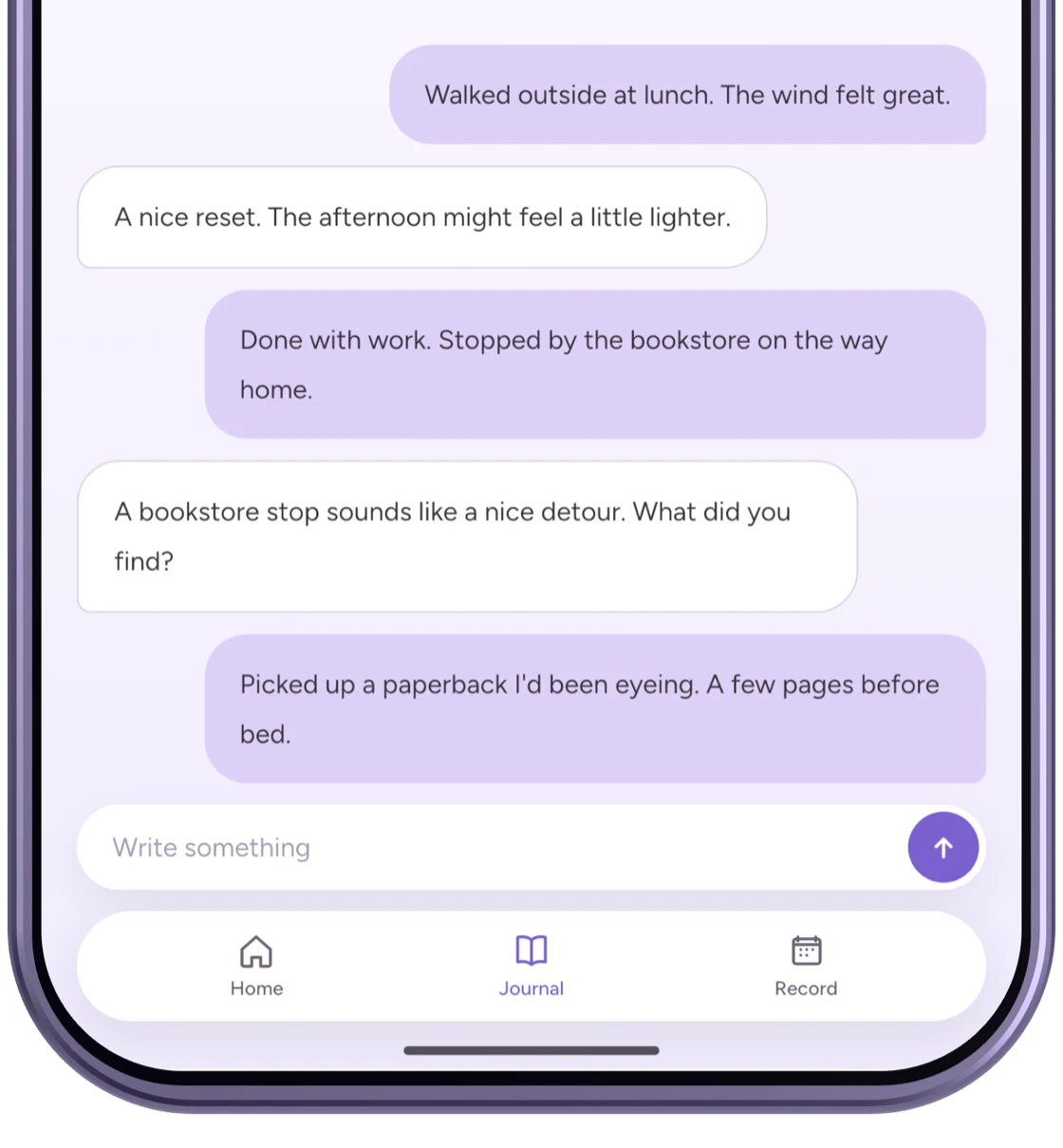
Principle 1: the AI never writes from nothing — your notes are the seed
Emopi Diary’s AI creates no entry without your notes. However short the line, your words are always the origin; the AI’s job is to receive them and gather them into today’s entry.
Images marked “Actual app UI” use fictional test data; other figures are illustrative recreations. Displayed content and AI replies are examples. Screens may vary by version.
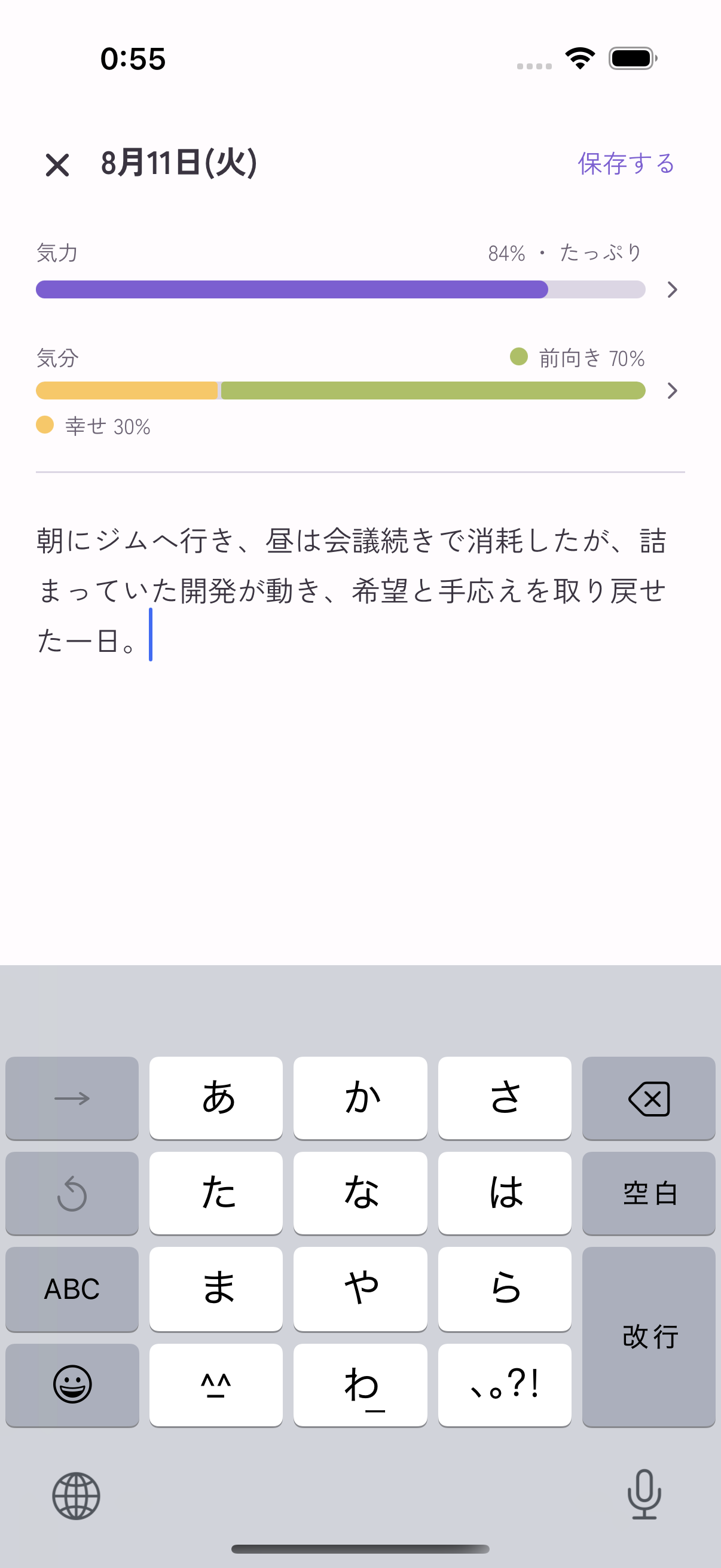
Principle 2: you can edit the summary, mood, and energy
Open the journal editor from the day’s settings to rewrite the summary and adjust mood or energy. If the draft misses what you meant, you can leave the day in your own words.
Saving a manual edit pauses new notes and AI summaries for that day. To add more later, choose the option to resume AI summaries in the same settings.
On data: journal text (notes and summaries) is encrypted with a dedicated key before storage. Details are on the privacy and data protection page.
Wrapping up
- An AI journal app splits the work of journaling with AI — as listener, coach, or analyst.
- Possible features include responses to short notes, summaries and tags, and suggested feeling words. How helpful these feel varies by person.
- Check three things: the AI’s distance, whether your words are the seed, and how data is handled.
- Emopi Diary is a listener built on two principles: the AI never writes from nothing, and you can edit the summary, mood, and energy. For fundamentals, see What is journaling?
- To choose between Emopi Diary, for journaling on your own, and Emopi, for sharing how you are with someone you care about, see Emopi vs. Emopi Diary.
Related articles


Emopi Diary
A journal you write with AI
Jot down a few words whenever something comes to mind, and AI shapes them into today’s entry — with mood, energy, and topic tags added automatically. Coming soon to iOS / Android.