
How to Start Mood Tracking: See the Rhythm You Cannot Remember
Mood tracking gives you a record of daily changes to look back on. Learn how to start simply, add feeling words when useful, and record mood and energy separately without making tracking a burden.
Emopi Editorial Team
Remembering last week’s mood can be difficult. Mood tracking gives you a record to return to, alongside what you remember now.
This article covers the basics of tracking your mood, how to keep the habit light, and how much detail you might want to record.
What mood tracking is
Mood tracking is the habit of capturing each day’s mood in some simple form — coloring a square in a planner, picking an emoji, tapping in an app. Unlike a journal, it works without sentences. One tap a day, sustained, is a real record.
What becomes visible
- Your rhythm: “I dip in the back half of the week,” “the day after a holiday runs heavy” — the shape of your own wave.
- Mood-event links: how sleep, a walk outside, or certain kinds of days relate to how you feel.
- Early signs of change: rereading the record is how you notice that an unusual state has been lingering. A record is a handle for seeing your own state clearly (and if a hard state persists, please bring that record to a medical professional — tracking is not a diagnosis).
Keeping it going — once a day, in the lightest form
Lightness matters even more here than with journaling.
- Try once a day as a starting point. Choose a convenient time. A review of studies in depression and bipolar disorder found reports of burden and worsening mood, but could not establish causality or an optimal frequency (Astill Wright et al., 2025). Once daily is our practical suggestion, not a scientific prescription. Reduce the frequency or pause if it feels burdensome.
- Make it a choice, not a composition. Picking from options can reduce the effort of an entry.
- Add one line when you can. A word on why multiplies the value of the record later. Just keep it optional.
You do not need to expect tracking alone to improve your mood. If looking back feels useful, use the record as one reference when considering rest or daily routines.
Resolution: what makes a mood record useful
The level of detail in the options is one point to consider.
Start with a simple scale; add words if useful
A five-point good-to-bad scale can capture broad changes with little effort. If you also want to remember distinctions such as “fun but exhausted,” add a feeling word or a short note. The useful level of detail is yours to choose.
Record moods as blends
Some days call for a blend such as “60% glad, 40% nervous.” Emotion granularity means distinguishing between similar emotions across situations. A meta-analysis found a small association between finer negative-emotion differentiation and fewer depressive symptoms (Hong et al., 2025). It did not test percentage-based mood pickers or show that recording a blend improves symptoms. For a practical way to find words, see our labeling guide.
Mood and energy are different axes
One more distinction worth keeping: mood (what you feel) versus energy (how much you have left). “In good spirits but running on empty” and “feeling low but physically fine” are different states. Tracking the two separately can help describe days when your mood and energy differ, without assuming what caused the difference.
How Emopi Diary does it — 23 feeling words, mood × energy
Emopi Diary builds this resolution philosophy into its mood tracking.
From a catalog of feeling words, with proportions
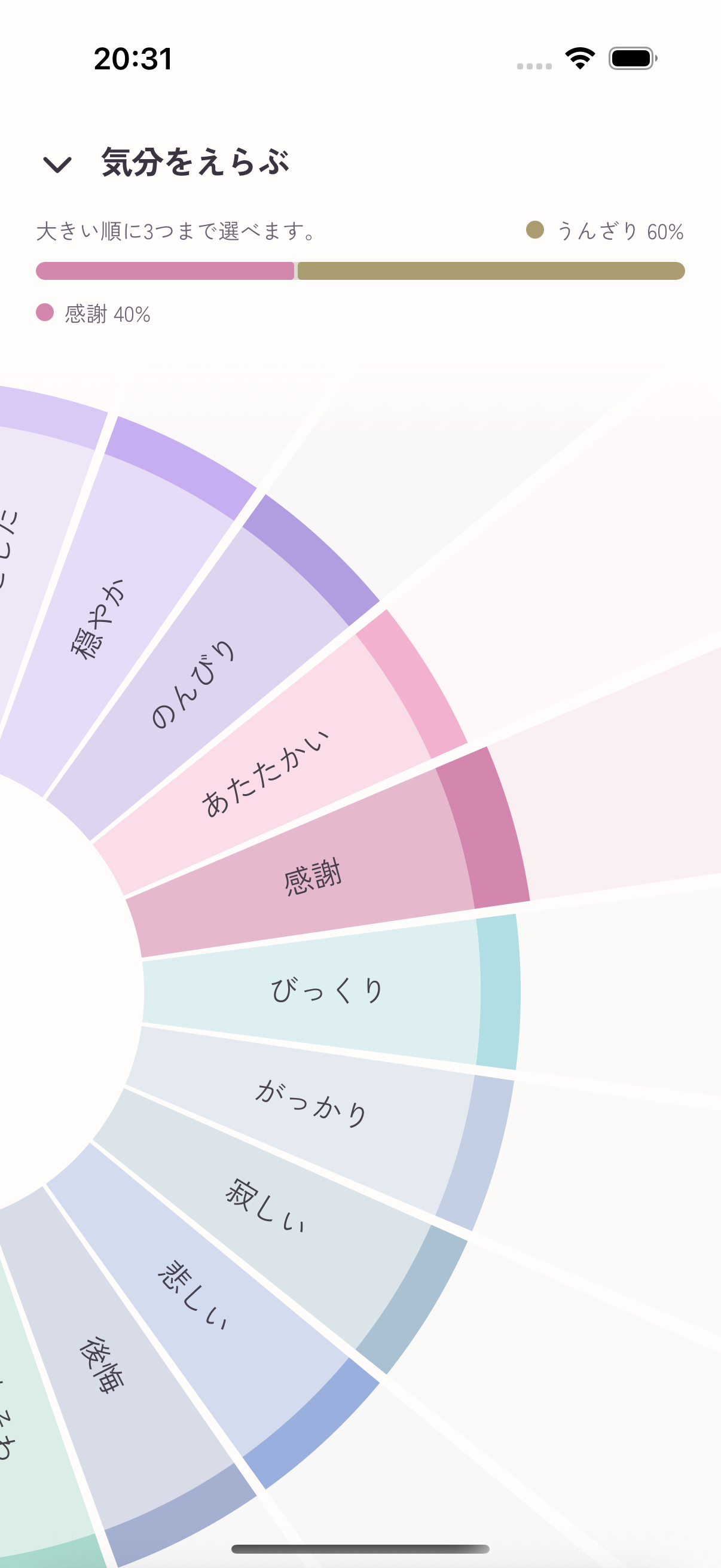
You can choose from 23 feeling words. The AI suggests labels and proportions from your notes. To change them yourself, pick up to three words from the wheel in order of fit. Manual proportions are 100% for one word, 60% / 40% for two, or 50% / 30% / 20% for three. These fixed proportions differ from the percentages in an AI estimate.
Images marked “Actual app UI” use fictional test data; other figures are illustrative recreations. Displayed content and AI replies are examples. Screens may vary by version.
Mood and energy, side by side
Each day’s record shows the mood mix and energy (0–100%) as separate axes. A day shaped like “positive mood, 42% energy” appears exactly as that.
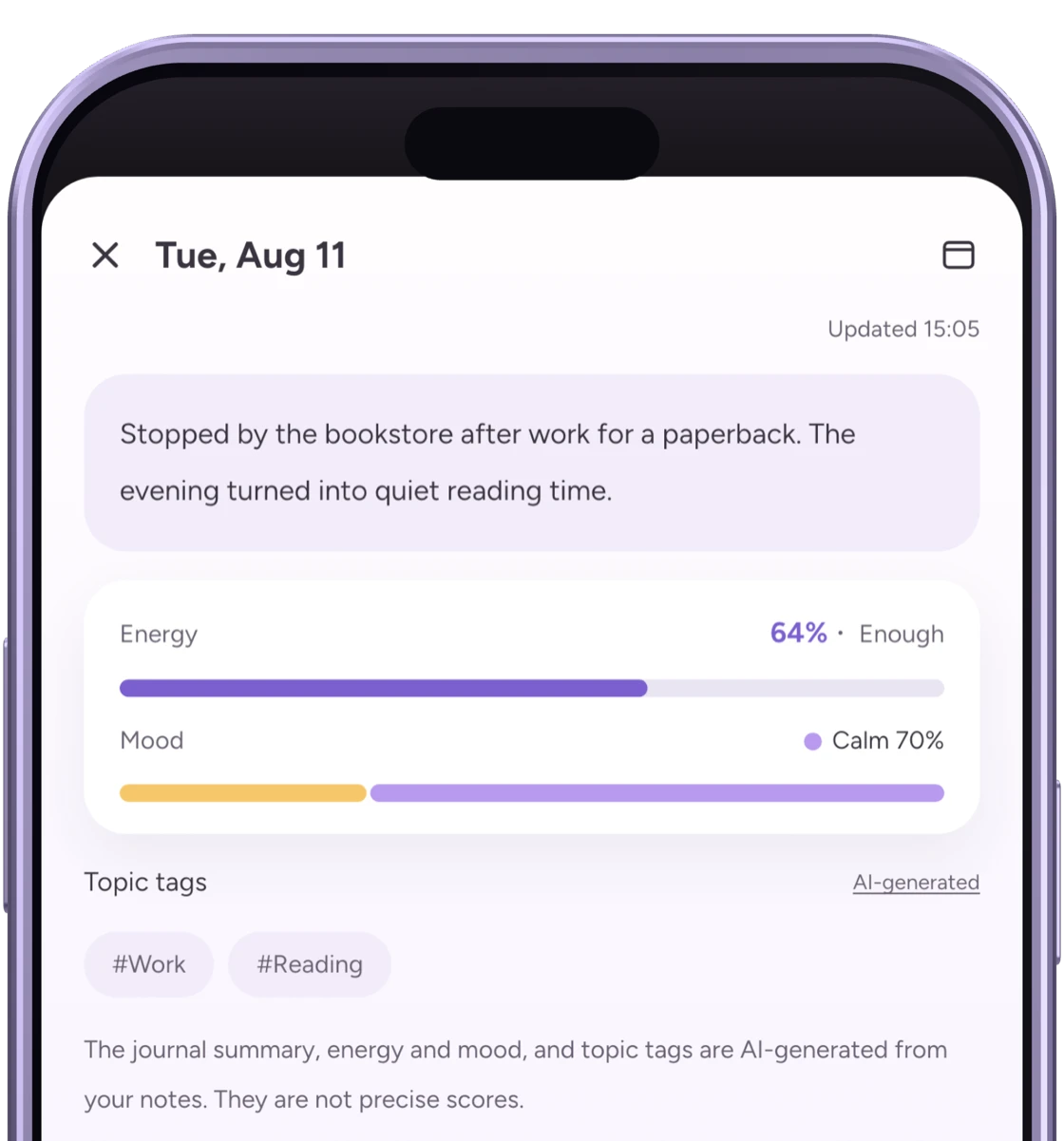
Energy is an AI estimate based on your notes, not a measurement of physical fitness or health. You can adjust it if it feels off.
Review a week’s trend and a month’s overview
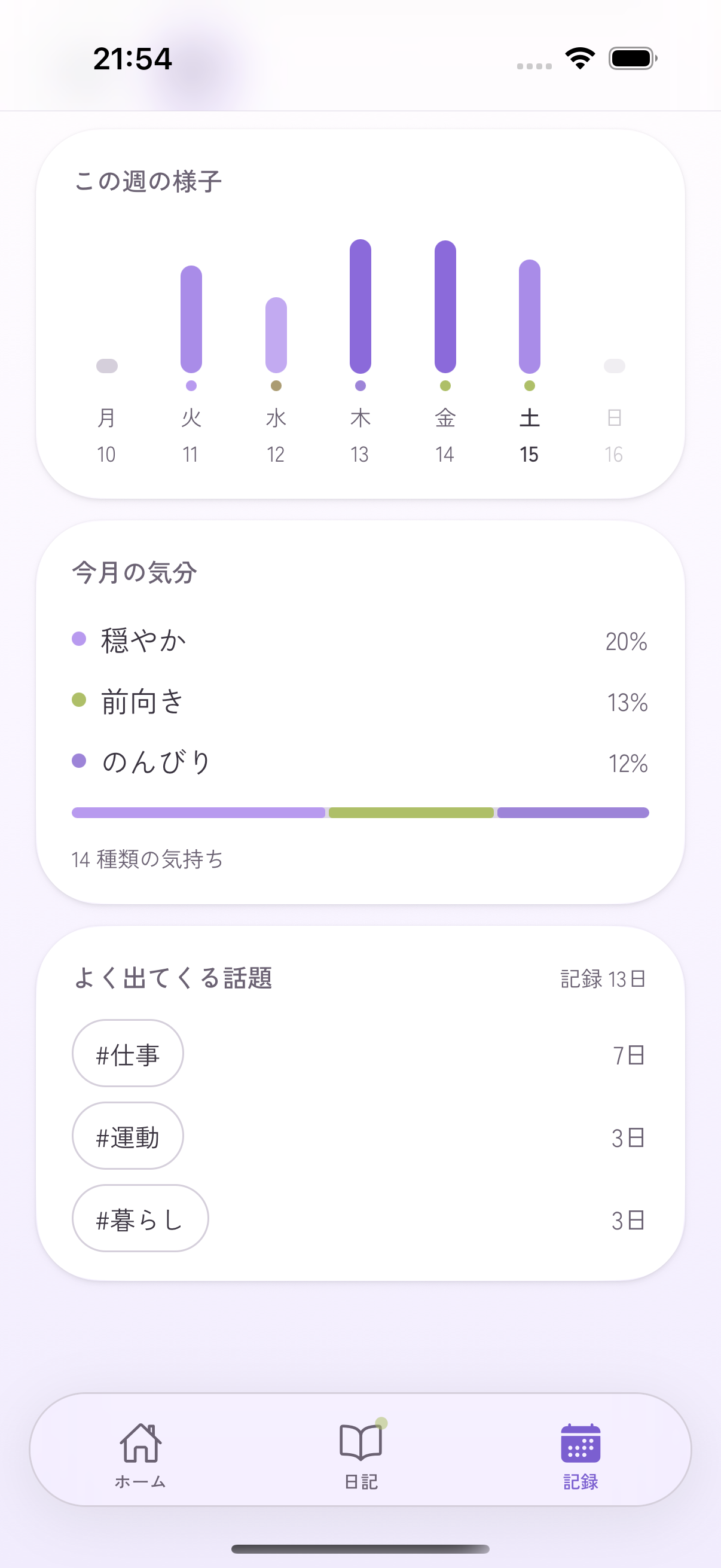
Scroll down in Records to see the weekly energy chart, the month’s most recorded moods, and how many days included each topic. A month with many work entries can be a prompt to open the original entries and see what happened.
Monthly percentages summarize recorded moods; they do not measure the time you spent feeling each way. They do not establish that work caused a mood or diagnose your health.
Wrapping up
- Mood tracking turns passing moods into something visible. Try a simple choice once a day, and adjust the frequency to suit you.
- Start with a simple scale and add feeling words if useful. Separating mood and energy gives you another way to look back.
- Emopi Diary builds this in with 23 feeling words and the mood × energy split. To go deeper into writing, see What is journaling?
Related articles

Emopi Diary
A journal you write with AI
Jot down a few words whenever something comes to mind, and AI shapes them into today’s entry — with mood, energy, and topic tags added automatically. Coming soon to iOS / Android.